

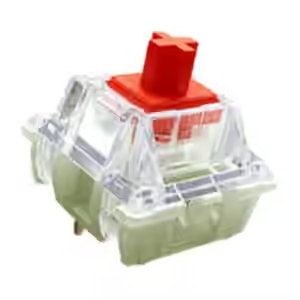
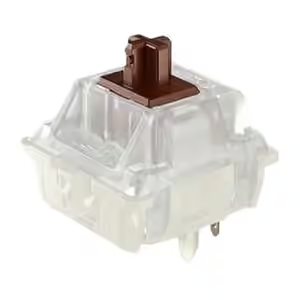
Cherry MX2A Red VS Cherry MX2A Brown

We are comparing the Cherry MX2A Red (Cherry) with the Cherry MX2A Brown (Cherry). Compare their published actuation, force, travel, feel, materials, durability, and keyboard compatibility.

Last Updated: November 20, 2026

Cherry MX2A Red

Cherry

View on Amazon
VS

Cherry MX2A Brown

Cherry

View on Amazon

Gaming Profile

Measures actuation, travel, and force. Shorter, lighter movement favors speed. Advanced input features add capability.

Tactile Profile

Measures bump or click intensity. It uses feel type and tactile-force rise. Higher scores mean stronger feedback.

Build and Durability

Measures published lifespan evidence. It uses documented construction details. It does not predict real-world reliability.

KEY DIFFERENCES OF Cherry MX2A Red AND Cherry MX2A Brown

Here’s how Cherry MX2A Red and Cherry MX2A Brown differ in their published use-case profiles and supported keyboard features. A higher tactile profile means more pronounced feedback, not universally better feel.

Cherry MX2A Brown: 2 advantages

Published advantages for Cherry MX2A Brown

2
  • Higher Tactile Profile score (66 vs 45)
  • Lighter bottom-out force (80 gf vs 100 gf)

SPECIFICATION COMPARISON OF Cherry MX2A Red AND Cherry MX2A Brown

Choose a profile to compare the specifications that matter for that use case. Highlighted advantages change with the selected profile and do not represent an overall quality verdict.

Highlights quicker response measurements and supported gaming input features.

Specification Cherry MX2A Red Cherry MX2A Brown
General Information
Switch Name: Cherry MX2A Red Cherry MX2A Brown
Brand: Cherry Cherry
Manufacturer: Cherry Cherry
Series: MX2A MX2A
Variant Color: Red Stem / Black Housing Brown Stem / Black Housing
Release Date: August 24, 2023 August 24, 2023
Switch Type: Mechanical Mechanical
Feel Type: Linear Tactile
Switch Form Factor: MX MX
Mount Type: PCB Mount PCB Mount
Force and Travel
Initial Force: 30 gf 30 gf
Operating Force: 45 gf 45 gf
Bottom-out Force: 100 gf 80 gf
Tactile Force: — 55 gf
Pre-travel: 2 mm 2 mm
Total Travel: 4 mm 4 mm
Adjustable and Magnetic Input
Adjustable Actuation:
Hall-effect Keyboard Required:
Sound and Build
Silent Dampeners:
Top Housing Material: Plastic polymer Plastic polymer
Bottom Housing Material: Plastic polymer / glass-fibre composite Plastic polymer / glass-fibre composite
Stem Material: Plastic polymer Plastic polymer
Spring Type: Barrel spring Barrel spring
Contact Material: MX Gold Crosspoint MX Gold Crosspoint
Factory Lubed:
Keyboard and Keycap Compatibility
Pin Count: 5 5

Tip: ▲ indicates a higher-is-better spec advantage, while ▼ indicates a lower-is-better advantage.

Discover More Keyboard Switch Comparisons

Keep either switch, then search for another switch to compare.

Select either keyboard switch below to choose which one stays in the comparison.

Frequently Asked Questions about Cherry MX2A Red vs Cherry MX2A Brown

Both list Mechanical for switch mechanism. Cherry MX2A Red lists Linear for feel type, while Cherry MX2A Brown lists Tactile for feel type.

Cherry MX2A Red and Cherry MX2A Brown have the same listed operating force (45 gf vs 45 gf).

Cherry MX2A Red and Cherry MX2A Brown have the same listed total travel (4 mm vs 4 mm).

Both list MX for form factor. Both list PCB Mount for mount type. Both list 5 for pin count.

Both Cherry MX2A Red and Cherry MX2A Brown have factory lubrication. Neither Cherry MX2A Red nor Cherry MX2A Brown has silent dampeners.

Cherry MX2A Red was released on August 24, 2023. Cherry MX2A Brown was released on August 24, 2023.

Disclaimer: Specs, pricing, and benchmarks are sourced from official manufacturer data and verified test results. While we strive for precision, product details and pricing may change. Comparigon may earn an affiliate commission on qualifying purchases.